Tools deployment#
Tool Store#
The [wellies.ToolStore][] is a collection class to instantiate and resolve
the tools configuration interaction. It also helps the handling of the different
tools that a suite Task might need at execution time through the load and
unload methods.
Considering a full feature tools configuration as below, we can explore how
the ToolStore makes setting up different execution environments easy.
tools:
  modules:
    conda:
      version: "22.11.1-2"
    toolbox:
      name: ecmwf-toolbox
      version: new

  packages:
    earthkit:
      type: "git"
      source: "git@github.com:ecmwf/earthkit-data.git"
      branch: master
      post_script: [
        "pip install .",
        ""pip show src | grep Version > version.txt",
      ]

  scripts:
      type: "rsync"
      source: "hpc-login:/path/to/project"
      post_script: "chmod ug+rx,o+r $ENV/*.sh $ENV/*.py"

  env_vars:
    PYTHONPATH: "$LIB_DIR/localbin"

  environments:
    suiteconda:
      type: conda
      depends: ["conda"]
      packages: ["earthkit"]
      extra_packages: ["python>=3.12"]
    localbin:
      type: folder
      depends: ["toolbox", "PYTHONPATH"]
      packages: ["scripts"]
Then, the code to go from the configuration file to the [wellies.ToolStore][], will look like:
import yaml
from wellies import ToolStore
with open("tools.yaml", 'r') as ftools:
    options = yaml.safe_load(ftools)
tool_store = ToolStore("$LIB_DIR", options["tools"])
print(tool_store.items())
dict_items([('conda', <wellies.tools.ModuleTool object at 0x7a87287db8c0>), ('toolbox', <wellies.tools.ModuleTool object at 0x7a872892da90>), ('earthkit', <wellies.tools.PackageTool object at 0x7a87287dba10>), ('scripts', <wellies.tools.PackageTool object at 0x7a8728995a90>), ('suiteconda', <wellies.tools.SimpleCondaEnvTool object at 0x7a87287da120>), ('localbin', <wellies.tools.FolderTool object at 0x7a87287dbb60>), ('PYTHONPATH', <wellies.tools.EnvVarTool object at 0x7a87287db380>)])
With the ToolStore object in place you can use it while defining execution
environments on your pyflow task scripts.
import pyflow as pf
t1 = pf.Task(
    name='t1',
    script=[
        tool_store.load('localbin'),
        "grib_ls precip.grib > field_list",
        "my_fancy_script.sh field_list precip.grib",
    ]
)
Here we have a task t1 that used the suite namespace environment localbin
to use some eccodes command and a executable script deployed as part of the
scripts package installed at localbin. The task's script main body will
look like:
# load tools and activate environment

set +ux
module unload ecmwf-toolbox || true
module load ecmwf-toolbox/new
set -ux

export PYTHONPATH=$LIB_DIR/localbin:${PYTHONPATH:-}

export PATH=$LIB_DIR/localbin:${PATH:-}
module list
grib_ls precip.grib > field_list
my_fancy_script.sh field_list precip.grib
Deploy tools family#
In the previous section we saw how the ToolStore object can be used at task
definition level to set up software dependencies and discoverability at
runtime. It was assumed, though, that all the tools were installed
in the used environment. How can we achieve that!?
So, wellies comes to help and provides the [wellies.DeployToolsFamily][] shortcut
that defines a whole ecflow setup family out-of-box from a tool store object.
In your suite generation code you can simply have:
from wellies import DeployToolsFamily
from pyflow import Suite

with Suite(name='suite1', files="."):
  node=DeployToolsFamily(tool_store)

print(node)
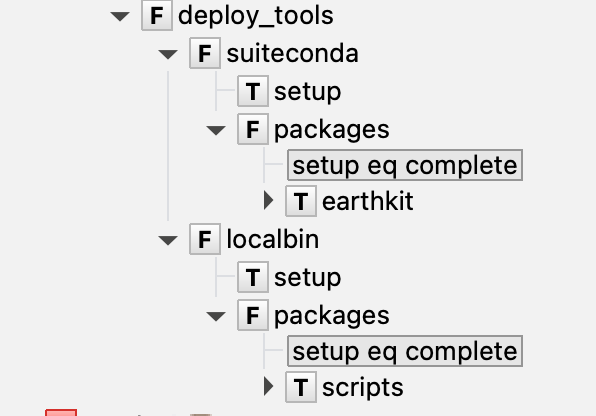
  family deploy_tools
    edit ECF_FILES './deploy_tools'
    family suiteconda
      edit ENV_NAME 'suiteconda'
      edit ECF_FILES './deploy_tools/suiteconda'
      task setup
      family packages
        trigger setup eq complete
        task earthkit
          label version "NA"
      endfamily
    endfamily
    family localbin
      edit ENV_NAME 'localbin'
      edit ECF_FILES './deploy_tools/localbin'
      task setup
      family packages
        trigger setup eq complete
        task scripts
          label version "NA"
      endfamily
    endfamily
  endfamily
Which in ecFlowUI will look like
The resulting script, for example, for the task suiteconda/setup will be:
#!/bin/bash

echo "Running on: $(hostname)" || true
set -x # echo script lines as they are executed
set -e # stop the shell on first error
set -u # fail when using an undefined variable


export ECF_PORT=%ECF_PORT%    # The server port number
export ECF_HOST=%ECF_HOST%    # The host name where the server is running
export ECF_NAME=%ECF_NAME%    # The name of this current task
export ECF_PASS=%ECF_PASS%    # A unique password
export ECF_TRYNO=%ECF_TRYNO%  # Current try number of the task

echo "Current working directory: $(pwd)"

%nopp

# load tools and activate environment

set +ux
module unload conda || true
module load conda/22.11.1-2
set -ux

rm -rf $LIB_DIR/suiteconda
conda create -p $LIB_DIR/suiteconda 'python>=3.12'

%end
and for suiteconda/packages/earthkit
#!/bin/bash

echo "Running on: $(hostname)" || true
set -x # echo script lines as they are executed
set -e # stop the shell on first error
set -u # fail when using an undefined variable


export ECF_PORT=%ECF_PORT%    # The server port number
export ECF_HOST=%ECF_HOST%    # The host name where the server is running
export ECF_NAME=%ECF_NAME%    # The name of this current task
export ECF_PASS=%ECF_PASS%    # A unique password
export ECF_TRYNO=%ECF_TRYNO%  # Current try number of the task

export ENV_NAME="%ENV_NAME%"

echo "Current working directory: $(pwd)"

%nopp

# load tools and activate environment

set +ux
module unload conda || true
module load conda/22.11.1-2
set -ux

set +ux
conda activate $LIB_DIR/suiteconda
set -ux
module list
# load tools and activate environment
# Main script for retrieving data
mkdir -p $LIB_DIR/build/${ENV_NAME:-}

dest_dir=$LIB_DIR/build/${ENV_NAME:-}/earthkit
rm -rf $dest_dir
giturl=git@github.com:ecmwf/earthkit-data.git
gitbranch=master
git clone $giturl --branch $gitbranch --single-branch --depth 1 $dest_dir
cd $dest_dir

# Post-script
pip install .
pip show src | grep Version > version.txt

ecflow_client --label=version $(if [[ -f version.txt ]]; then cat version.txt; else echo NA; fi)

%end
To know more about the scripts content and how to tune different options, please check the tools config page