Data deployment#
Static data store#
The [wellies.StaticDataStore][] is a collection class to instantiate a dict-like configuration of multiple entries of static datasets.
With a static_data section in your yaml configuration file like the one below,
you can easily define and share different data preparation tasks for your workflow.
static_data:
    mars_data:
        type: mars
        request:
          class: od
          type: an
          expver: "1"
          date: "19990215"
          time: "12"
          param: t
          levtype: "pressure level"
          levelist: [1000, 850, 700, 500]
          target: t.grb
        post_script: "pproc-interpol --grid SMUFF-OPERA-2km-proj t.grb t_2km.grb"
    static_maps:
        type: ecfs
        source: ec:/arch/static/
        files: [dem.grib, landcover.grib]
        post_script: "echo 'Copy Done'"
Then, the code to go from the configuration file to the [wellies.StaticDataStore][], including all the retrieval scripts, will look like:
import yaml
from wellies import StaticDataStore
with open("data.yaml", 'r') as fdata:
    options = yaml.safe_load(fdata)
sdata_store = StaticDataStore("$DATA_DIR", options["static_data"])
print(sdata_store)
StaticDataStore: {'mars_data': {'type': 'mars', 'request': {'class': 'od', 'type': 'an', 'expver': '1', 'date': '19990215', 'time': '12', 'param': 't', 'levtype': 'pressure level', 'levelist': [1000, 850, 700, 500], 'target': 't.grb'}, 'post_script': 'pproc-interpol --grid SMUFF-OPERA-2km-proj t.grb t_2km.grb'}, 'static_maps': {'type': 'ecfs', 'source': 'ec:/arch/static/', 'files': ['dem.grib', 'landcover.grib'], 'post_script': "echo 'Copy Done'"}}
Deploy data family#
An instance of a [wellies.StaticDataStore][] can be directly used with the [wellies.DeployDataFamily][] to create a fully defined data retrieval Family on a pyflow.Suite.
from wellies import DeployDataFamily
from pyflow import Suite

with Suite(name='suite1', files="."):
  node=DeployDataFamily(sdata_store)

print(node)
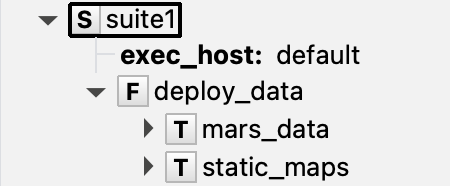
  family deploy_data
    edit ECF_FILES './deploy_data'
    task mars_data
      label version "NA"
    task static_maps
      label version "NA"
  endfamily
Which in ecFlowUI will look like
The resulting script, for example, for the task static_maps will be:
#!/bin/bash

echo "Running on: $(hostname)" || true
set -x # echo script lines as they are executed
set -e # stop the shell on first error
set -u # fail when using an undefined variable


export ECF_PORT=%ECF_PORT%    # The server port number
export ECF_HOST=%ECF_HOST%    # The host name where the server is running
export ECF_NAME=%ECF_NAME%    # The name of this current task
export ECF_PASS=%ECF_PASS%    # A unique password
export ECF_TRYNO=%ECF_TRYNO%  # Current try number of the task

echo "Current working directory: $(pwd)"

%nopp

# Main script for retrieving data
mkdir -p $DATA_DIR

dest_dir=$DATA_DIR/static_maps
rm -rf $dest_dir
mkdir -p $dest_dir
ecp ec:/arch/static/dem.grib ec:/arch/static/landcover.grib  $dest_dir/
cd $dest_dir

# Post-script
echo 'Copy Done'


%end
To know more about the scripts content and how to tune different options, please check the data config page